
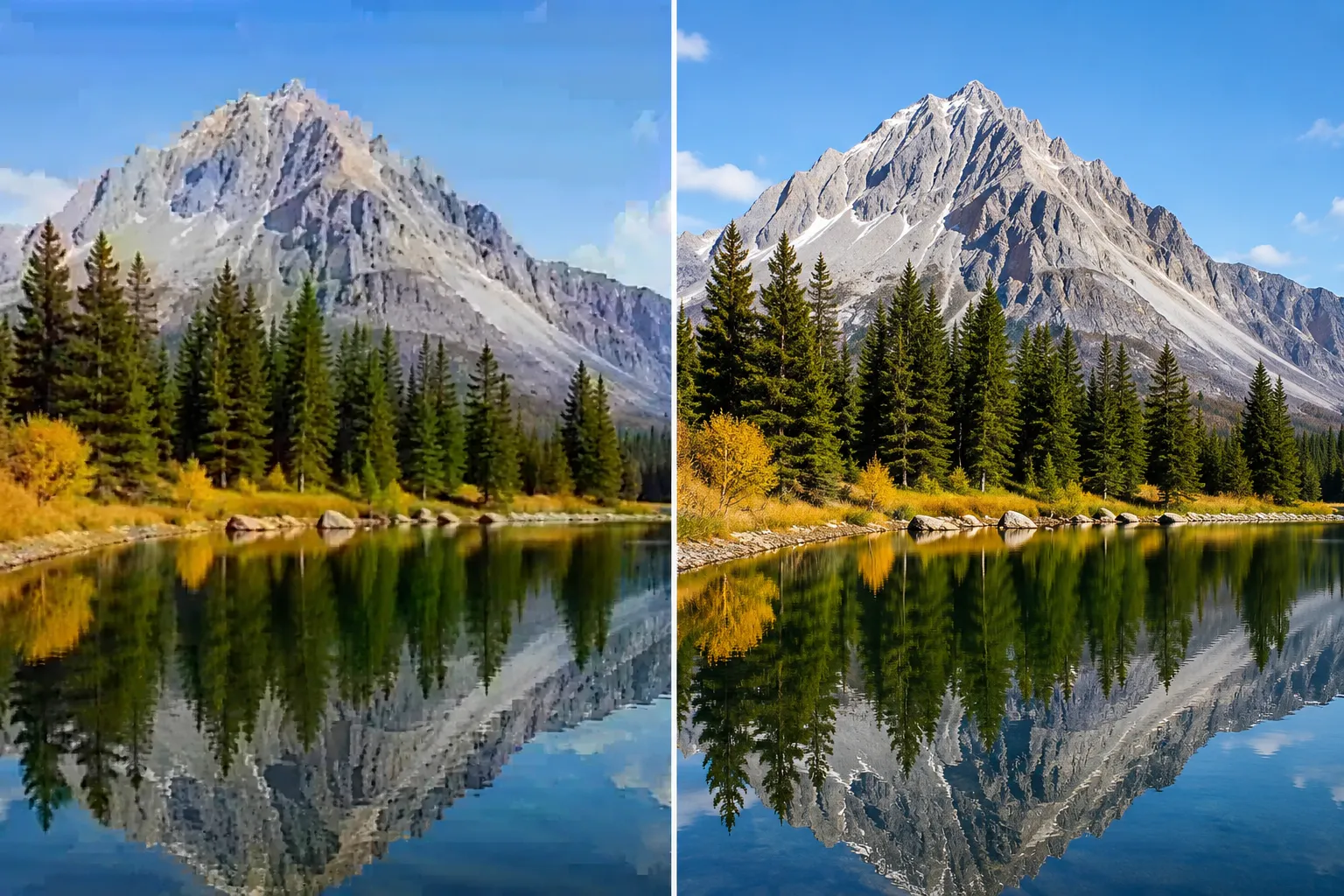
1. What is Image Compression?
Image compression reduces the file size of images by removing or optimizing data. The two main approaches are lossy compression (removes data permanently) and lossless compression (preserves all original data).
📊 Why Compression Matters
⚠️ Warning
🔴 Lossy Compression
Permanently removes data deemed "less important" to human eyes.
- ✅ Much smaller file sizes (70-90% reduction)
- ✅ Faster loading times
- ❌ Permanent quality loss
- ❌ Not suitable for text or sharp lines
- Formats: JPEG, WebP (lossy), AVIF
✅ Good to Know
🟢 Lossless Compression
Optimizes data structure without discarding any information.
- ✅ Perfect quality preservation
- ✅ Reversible - original can be restored
- ✅ Ideal for text, logos, medical images
- ❌ Larger file sizes than lossy
- Formats: PNG, GIF, WebP (lossless), TIFF
2. Lossy Compression: Complete Deep Dive
Lossy compression works by removing data that human eyes are less likely to notice. The JPEG algorithm, developed in 1992, remains the most widely used lossy format.
// How JPEG Lossy Compression Works
Step 1: Color Space Conversion (RGB → YCbCr)
→ Y = Luminance (brightness) - Keep most detail
→ Cb = Blue difference - Reduce resolution
→ Cr = Red difference - Reduce resolution
→ Human eyes are less sensitive to color than brightness

Step 2: Downsampling (Chroma Subsampling)
→ 4:2:0 subsampling (common): Color info halved
→ 4:4:4: No subsampling (highest quality)
→ 4:2:2: Color info halved horizontally
→ Typical reduction: 50% file size with minimal visible loss

Step 3: Discrete Cosine Transform (DCT)
→ Splits image into 8x8 pixel blocks
→ Converts spatial data to frequency data
→ High frequencies (sharp edges) = less important
→ Low frequencies (smooth areas) = more important

Step 4: Quantization (The "Lossy" Step)
→ Divides frequencies by predefined matrix
→ Higher divisor = more compression = more loss
→ High frequencies get divided more (discarded)
→ This step is irreversible!

Step 5: Entropy Encoding (Huffman/Zigzag)
→ Compresses remaining data without further loss
→ Zigzag pattern groups similar frequencies
→ Huffman coding for final compression

Result: 80-90% size reduction with acceptable quality
Quality 100%
1.2 MB
Original JPEG
Quality 85%
240 KB
80% reduction
Quality 50%
60 KB
95% reduction
💡 Pro Tip: Finding the Sweet Spot
For photographs, quality 75-85% is the "magic zone" - file size reduces 80% while most people can't see any difference from original. Below 60%, artifacts become visible.
3. Lossless Compression: Complete Deep Dive
Lossless compression reorganizes data more efficiently without discarding anything. PNG is the most popular lossless format.
// How PNG Lossless Compression Works
Step 1: Filtering (Prediction)
→ Analyzes each pixel and predicts its value
→ Common filters:
   - None: No filter (for random data)
   - Sub: Difference from left pixel
   - Up: Difference from above pixel
   - Average: Average of left and above
   - Paeth: Complex edge detection
→ Smaller differences = more compressible

Step 2: DEFLATE Compression (Same as ZIP/GZIP)
→ LZ77 algorithm: Replaces repeating patterns with references
   Example: "ABCABCABC" → "ABC[repeat 3x]"
→ Huffman coding: Variable-length codes for common values
   ' ' (space) → 0 (1 bit)
   'e' → 10 (2 bits)
   'z' → 110011 (6 bits)

Step 3: Different Compression Strategies
→ Strategy 1: Speed-focused (faster encoding, 2-5% less compression)
→ Strategy 2: Size-focused (slower encoding, maximum compression)
→ Strategy 3: Balanced (default for most tools)

Result: 10-40% size reduction with no quality loss
📊 PNG Compression Levels
| Level | Speed | Size Reduction |
|---|---|---|
| Level 0 | Instant | 0% (uncompressed) |
| Level 3 | Very Fast | 15-25% |
| Level 6 | Moderate | 25-35% |
| Level 9 | Slow | 35-45% |
🎯 When PNG is Better Than JPEG
- Screenshots and UI elements
- Logos and icons
- Text-heavy images
- Line art and diagrams
- Images needing transparency
- Medical/diagnostic images
- Archival master copies
4. Side-by-Side Comparison Table
| Property | Lossy (JPEG/WebP) | Lossless (PNG) |
|---|---|---|
| Quality Preservation | ❌ Permanent data loss | ✅ Perfect, reversible |
| File Size Reduction | 70-95% | 10-40% |
| Best For Photos | ✅ Excellent | ❌ Poor (large files) |
| Best For Text/Logos | ❌ Poor (blurry edges) | ✅ Excellent |
| Transparency Support | ❌ No (JPEG only) | ✅ Yes (PNG) |
| Animation Support | ❌ No | ❌ No (APNG limited) |
| Compression Speed | Fast | Slower (PNG) |
| Multiple Compressions | ❌ Not recommended (quality snowballs) | ✅ Can recompress indefinitely |
| Color Depth | 24-bit (16.7M colors) | 24-bit + 8-bit alpha |
| Progressive Loading | ✅ Yes (Progressive JPEG) | ❌ No (PNG loads top to bottom) |
5. Algorithm Differences: How Each Works
🔴 Lossy Algorithm (JPEG)
Process is irreversible - original data cannot be recovered
🟢 Lossless Algorithm (PNG)
Process is reversible - original can be perfectly reconstructed
6. Visual Quality Analysis
JPEG Compression Artifacts by Quality Level
100%
Perfect quality
Largest file
85%
Excellent
Sweet spot
60%
Visible artifacts
Acceptable for web
30%
Heavy artifacts
Not recommended
⚠️ Warning
⚠️ Common JPEG Artifacts
- Blocking: 8x8 pixel blocks become visible
- Ringing: Ghosting around sharp edges
- Color bleeding: Colors spill across boundaries
- Posterization: Smooth gradients become banded
7. File Size Comparison by Image Type
| Image Type | Original | Lossless (PNG) | Lossy 85% (JPEG) | Lossy 70% |
|---|---|---|---|---|
| Photograph (landscape) | 5.0 MB | 4.2 MB (16% reduction) | 850 KB (83% reduction) | 350 KB (93% reduction) |
| Photograph (portrait) | 4.0 MB | 3.4 MB (15% reduction) | 680 KB (83% reduction) | 280 KB (93% reduction) |
| Screenshot (UI) | 2.0 MB | 350 KB (82% reduction) | 850 KB (58% reduction) | 400 KB (80% reduction) |
| Logo (simple) | 500 KB | 8 KB (98% reduction) | 45 KB (91% reduction) | 25 KB (95% reduction) |
| Text-heavy document | 1.0 MB | 120 KB (88% reduction) | 350 KB (65% reduction) | 180 KB (82% reduction) |
| Medical X-ray | 10 MB | 8.5 MB (15% reduction) | N/A (cannot use lossy) | N/A |
💡 Pro Tip
📊 Key Insight
For photographs, lossy compression wins dramatically (80-90% reduction). For graphics with sharp edges and text, lossless PNG often beats lossy JPEG in both size AND quality!
8. When to Use Which? Decision Guide
✅ Good to Know
✅ Use Lossy Compression (JPEG/WebP) For:
- Photographs: Landscapes, portraits, product photos
- Web images: Blog posts, social media, galleries
- Large image libraries: Where file size is critical
- Mobile apps: Reducing bandwidth and storage
- Email attachments: Smaller files send faster
- Preview/thumbnail images: Where perfect quality isn't needed
- Background images: Where minor artifacts are acceptable
📘 Info
✅ Use Lossless Compression (PNG/WebP) For:
- Logos and icons: Sharp edges and transparency needed
- Screenshots: UI elements and text must remain sharp
- Medical/Diagnostic images: Cannot lose any detail
- Archival masters: Keep original quality forever
- Print materials: High-quality output required
- Images with transparency: PNG supports alpha channel
- Legal documents: Must maintain exact reproduction
📘 Info
🎯 Quick Decision Flowchart
START: Is this image for the web or print?
    │
    ├─ WEB → Does it have text, sharp edges, or logos?
    │         │
    │         ├─ YES → Use Lossless (PNG/WebP Lossless)
    │         │
    │         └─ NO  → Use Lossy (JPEG/WebP Lossy)
    │                  Quality: 75-85% for photos
    │
    └─ PRINT → Is archival/perfect quality required?
                │
                ├─ YES → Use Lossless (PNG/TIFF)
                │
                └─ NO  → Lossy may be acceptable (Quality 90%+)
9. Format Guide: JPEG, PNG, WebP, AVIF
| Format | Type | Best For | Compression Ratio | Browser Support |
|---|---|---|---|---|
| JPEG | Lossy | Photos, web images | 10:1 to 100:1 | 100% |
| PNG | Lossless | Logos, text, transparency | 2:1 to 5:1 | 100% |
| WebP | Both | Modern web (best of both) | Lossy: 25-35% better than JPEG Lossless: 26% better than PNG | 97% |
| AVIF | Both | Next-gen web | 50% better than WebP | 85% (growing) |
| GIF | Lossless | Animations (256 colors max) | Very poor | 100% |
| TIFF | Both | Print, medical, archival | Varies | Limited |
📘 Info
🚀 Modern Web Recommendation (2025)
Use WebP as your primary format with JPEG/PNG fallbacks. For maximum optimization, use AVIF with WebP fallback. AVIF offers 50% better compression than WebP but has slightly lower browser support (85% vs 97%).
10. Understanding Compression Levels
JPEG Quality Levels Explained
PNG Compression Levels Explained
Note: Unlike JPEG, PNG compression does not affect visual quality - only file size and processing time!
11. Real-World Test Results
// Test: 10MB professional photograph
Test Image Specs:
→ Resolution: 6000 x 4000 pixels (24MP)
→ Original: 10.0 MB (RAW)

─────────────────────────────────────────
FORMAT          QUALITY    SIZE    REDUCTION    VISUAL QUALITY
─────────────────────────────────────────
PNG             Lossless   8.2 MB    18%         Perfect
JPEG            100%       3.5 MB    65%         Perfect
JPEG            90%        1.8 MB    82%         Excellent
JPEG            85%        1.2 MB    88%         Great (Recommended)
JPEG            80%        900 KB    91%         Good
JPEG            70%        550 KB    95%         Acceptable for web
JPEG            50%        280 KB    97%         Visible artifacts
WebP (Lossy)    85%        800 KB    92%         Excellent
WebP (Lossy)    80%        600 KB    94%         Great
WebP (Lossless) Lossless   5.5 MB    45%         Perfect
AVIF            85%        500 KB    95%         Excellent
─────────────────────────────────────────

BEST RECOMMENDATION FOR WEB:
→ AVIF @ 85% quality (if browser supports)
→ WebP @ 85% quality (fallback)
→ JPEG @ 85% quality (universal fallback)

Resulting size: ~500-800KB (92-95% reduction!)
12. Best Practices by Use Case
🌐 Website Images
- Hero images: WebP/AVIF @ 75-85% quality
- Product photos: WebP @ 80-85% quality
- Thumbnails: JPEG @ 70-75% quality
- Icons/Logos: PNG/Lossless WebP
- Backgrounds: JPEG @ 60-70% quality
📱 Mobile Apps
- App icons: PNG/Lossless WebP
- Onboarding screens: WebP @ 85%
- User avatars: JPEG @ 75-80%
- Offline content: JPEG @ 70%
📧 Email Marketing
- All images: JPEG @ 80-85%
- Avoid PNG (email clients block large files)
- Total email size: Keep under 1MB
🖨️ Print Design
- Photos: TIFF/PSD (lossless)
- Logos: AI/EPS (vector) or PNG
- No JPEG for final print output
📱 Social Media
- Instagram: JPEG @ 85%
- LinkedIn: PNG for logos, JPEG for photos
- Twitter: JPEG @ 80-85%
- Facebook: JPEG @ 80%
🏥 Medical/Archival
- Always use Lossless (PNG/TIFF/DICOM)
- Never use lossy compression
- Store original + compressed copy
13. Frequently Asked Questions
❓ Can I convert lossy back to lossless?
No. Once data is lost through lossy compression, it's gone forever. Converting a JPEG to PNG will preserve the artifacts but won't restore original quality. Always keep original files!
❓ Does compressing multiple times make quality worse?
Yes! Each time you save a JPEG, it applies compression again. This is called "generation loss." Always edit from original, not previously compressed versions.
❓ Which is better for screenshots?
PNG (lossless) is much better for screenshots. JPEG creates artifacts around text and UI elements. A PNG screenshot is often smaller than a JPEG screenshot anyway!
❓ What's the best format for web in 2025?
WebP is the current sweet spot (97% browser support, 25-35% better than JPEG). For cutting-edge, use AVIF (85% support, 50% better than WebP) with WebP fallback.
❓ Does compression affect SEO?
Yes! Google considers page speed as a ranking factor. Smaller images = faster loading = better SEO. Properly compressed images can improve your search rankings significantly.
❓ What quality should I use for e-commerce product photos?
85% quality JPEG/WebP is ideal. It reduces file size by 80-85% while maintaining excellent quality that shows product details clearly. For zoom functionality, use 90-95%.
14. Conclusion
Choosing between lossy and lossless compression isn't about which is "better" - it's about understanding your specific use case and priorities.
🎯 Quick Summary
🔴 Lossy Compression
Choose when file size is priority and perfect quality isn't required. Best for web photos, email, social media.
🟢 Lossless Compression
Choose when quality is critical. Best for logos, text, medical images, archives, and master copies.
🏆 Best of Both Worlds
Modern formats like WebP and AVIF support BOTH lossy and lossless compression - use them!


